

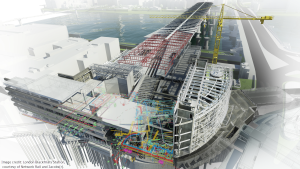
NTTS 認可課程 "BIM Technology in 4D Simulation & Clash Detection"

本課程已獲創新科技署新科技培訓計劃認可,合資格機構學員可獲50%學費資助。

學生作品 | 課程內容 | 報名 | 查詢

有關課程查詢,歡迎致電 36053322 | 23322302與我們的客戶服務主任聯絡。
For Enquiry, please contact 36053322 | 23322302

課程重點

  • 本課程已獲創新科技署新科技培訓計劃認可,合資格機構學員可獲50%學費資助。
  • BIM技術日漸成熟,亦漸成業界標準,必需準備充足,以能於激烈的就業市場屹立不倒。
  • 課程由淺入深,全面裝備學員使用以至管理 BIM項目。
  • 使用AOTC (Autodesk 官方培訓教材),確保課程質素。
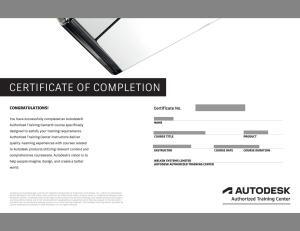
  • 學員修畢課程,會獲頒Autodesk原廠認可修業證書,為你的實力加上專業肯定。

新科技培訓計劃 (NTTS)

新科技培訓計劃 (NTTS) 是香港創新科技署的一項資助計劃,若 貴公司為本港非政府或其資助機構, 報讀課程的員工, 將獲資助50%學費。

按此下載新科技培訓計劃 (NTTS) 申請表格

課程介紹

Navisworks在建築資訊模型(BIM)中處於核心地位。修畢課程之學員將懂得使用Navisworks 2012 軟件,在施工前瞭解潛在問題,從而優化設計決策、建築實施、性能預測和規劃等環節。本課程使用及教授Autodesk Navisworks 2012,並全面地覆蓋以下多個BIM熱門課題:

•     Clash & Interference Management 衝突與干涉管理
•     Photorealistic Visualization 相片擬真視覺化
•     Simulate Construction Schedules and Logistics in 4D 4D 模擬施工進度及組織工作

想成為BIM專家?切勿錯過今次的Autodesk Navisworks 2012課程!名額有限,報名從速!

課程簡介 (請用高清及全屏幕瀏覽獲最佳較果)

課程時間及收費

課程時間
上課地點
18小時共6堂課程
多謝各位支持!課程已開班,新的開課日期將稍後公佈。
我們可獨立為有興趣報讀之公司安排課程,並協助申請新科技培訓計劃(NTTS)資助。申請程序簡便,歡迎有興趣報讀之公司與我們聯絡。歡迎致電3605 3325查詢或安排課程!
九龍旺角彌敦道585號富時中心3樓 (信和中心對面)
學費
$4200 (申請新科技培訓計劃的50%支助後為$2,100)

其他NTTS課程

Architectural Design Practice with BIM
Revit MEP 屋宇裝備基礎課程

報名

有關課程查詢,歡迎致電 36053322 | 23322302與我們的客戶服務主任聯絡。
For Enquiry, please contact 36053322 | 23322302

Detailed Course Outline 課程內容

Getting Started

  • Workspace Overview
  • Opening and Appending Files in NavisWorks
  • Saveing, Merging, and Refreshing Files
  • Database Support (Data Tools)

3D Model Review

  • Navigation
  • The NavisWork Engine
  • Selection Tree and Selecting Objects
  • Hiding Objects and Overriding Materials
  • Object Properties
  • Measuring and Moving Objects
  • Selection and Search Sets
  • Viewpoints
  • Comments and Redlining
  • Animations
  • Sectioning
  • Hyperlinks
  • Comparing Models
  • Switchback
  • NavisWorks Real-Time Rendering

TimeLiner

  • TimeLiner Overview
  • Creating Tasks
  • Import Tasks from External Project File
  • TimeLiner Simulation
  • Configuring and Defining a Simulation
  • Simulation Export

Animator

  • Animator Overview
  • Creating Basic Animation
  • Cameras and Camera Viewpoints
  • Manipulate Geometry Objects in an Animation Set
  • Section Plane Sets
  • Controlling Animation Scene Playback
Scripter

  • Scripter Overview
  • Creating and Managing Scripts
  • Events
  • Creating and Configure Events

Presenter Basics

  • Presenter Overview
  • Apply Materials to Model Items
  • Adding Lighting Effects to a Scene
  • Adding Background Effects
  • Rendering Effects
  • Outputting Rendered Images
  • Outputting Animations (Videos)

Presenter Advanced Features

  • Editing and Managing Materials
  • Advanced Material Editing
  • Ground Planes
  • Individual Light Effects
  • Imaged-Based Lighting
  • Environment Backgrounds and Reflections
  • Custom Environments
  • Light Scattering
  • RPC (Rich Photorealistic Content)

Clash Detective

  • Clash Detective Overview
  • Selecting Items to Be Clashed
  • Clash Test Settings
  • Setting Clash Rules
  • Clash Results
  • Audit Checks
  • Create and Save Batches of Clash Test
  • Export and Import Clash Test
  • Custom Clash Test
  • Laser Scan Data Clashing
  • Holding and Releasing Objects
  • SwitchBack in Clash Detective
  • Time-Based Clashing

Enquiry 查詢

您的姓名 〈需填寫〉

您的電子郵件信箱 〈需填寫〉

您的聯絡電話 〈需填寫〉

請選擇以下活動:
 NTTS課程 ” BIM Technology in 4D Simulation & Clash Detection”
請填寫留位數目:

驗証碼 〈需填寫〉
captcha
Please re-type above words 請鍵入以上文字驗證